

Descripción
This plugin integrates with the WPVulnerability API to provide real-time vulnerability assessments for your WordPress core, plugins, themes, PHP version, Apache HTTPD, nginx, MariaDB, MySQL, ImageMagick, curl, memcached, Redis, and SQLite.
It delivers detailed reports directly within your WordPress dashboard, helping you stay aware of potential security risks. Configure the plugin to send periodic notifications about your site’s security status, ensuring you remain informed without being overwhelmed. Designed for ease of use, it supports proactive security measures without storing or retrieving any personal data from your site.
Fiabilidad de los datos
La información proporcionada por la base de datos proviene de diferentes fuentes que han sido revisadas por terceros. No existe ningún tipo de responsabilidad sobre la información. Actúa por tu cuenta y riesgo.
Using the plugin
WP-CLI
You can use the following WP-CLI commands to manage and check vulnerabilities:
- Core:
wp wpvulnerability core - Plugins:
wp wpvulnerability plugins - Themes:
wp wpvulnerability themes - PHP:
wp wpvulnerability php - Apache HTTPD:
wp wpvulnerability apache - nginx:
wp wpvulnerability nginx - MariaDB:
wp wpvulnerability mariadb - MySQL:
wp wpvulnerability mysql - ImageMagick:
wp wpvulnerability imagemagick - curl:
wp wpvulnerability curl - memcached:
wp wpvulnerability memcached - Redis:
wp wpvulnerability redis - SQLite:
wp wpvulnerability sqlite
To configure the plugin you can use:
- Hide component:
wp wpvulnerability config hide <component> [on|off] - Notification email:
wp wpvulnerability config email <emails>(comma separatted) - Notification period:
wp wpvulnerability config period <never|daily|weekly> - Log retention:
wp wpvulnerability config log-retention <0|1|7|14|28>(in days) - Cache duration:
wp wpvulnerability config cache <1|6|12|24>(in hours)
All commands support the --format option to specify the output format:
--format=table: Displays the results in a table format (default).--format=json: Displays the results in JSON format.
Need help?
wp wpvulnerability --help: Displays help information for WPVulnerability commands.wp wpvulnerability [command] --help: Displays help information for a WPVulnerability command.
REST API
The WPVulnerability plugin provides several REST API endpoints to fetch vulnerability information for different components of your WordPress site.
- Core:
/wpvulnerability/v1/core - Plugins:
/wpvulnerability/v1/plugins - Themes:
/wpvulnerability/v1/themes - PHP:
/wpvulnerability/v1/php - Apache HTTPD:
/wpvulnerability/v1/apache - nginx:
/wpvulnerability/v1/nginx - MariaDB:
/wpvulnerability/v1/mariadb - MySQL:
/wpvulnerability/v1/mysql - ImageMagick:
/wpvulnerability/v1/imagemagick - curl:
/wpvulnerability/v1/curl - memcached:
/wpvulnerability/v1/memcached - Redis:
/wpvulnerability/v1/redis - SQLite:
/wpvulnerability/v1/sqlite
The WPVulnerability REST API uses Application Passwords for authentication. You need to include a valid Application Password in the Authorization header of your requests.
Example Request with Authentication
curl -X GET https://example.com/wp-json/wpvulnerability/v1/plugins -u username:application_password
Replace username with your WordPress username and application_password with your Application Password.
Extra Configurations
«From:» mail (since: 3.2.2)
If, for some reason, you need the emails sent by the plugin to have a From different from the site administrator, you can change it from the wp-config.php by adding a constant:
define( 'WPVULNERABILITY_MAIL', 'sender@example.com' );
If the constant is active, it will be visible in the configuration screen.
Force hiding checks (since: 4.1.0)
If you want to always hide a specific component, you can define a constant in wp-config.php. When set to true, the option will be checked automatically in the settings screen and the related analysis will be skipped.
Example:
define( 'WPVULNERABILITY_HIDE_APACHE', true );
Available constants: WPVULNERABILITY_HIDE_CORE, WPVULNERABILITY_HIDE_PLUGINS, WPVULNERABILITY_HIDE_THEMES, WPVULNERABILITY_HIDE_PHP, WPVULNERABILITY_HIDE_APACHE, WPVULNERABILITY_HIDE_NGINX, WPVULNERABILITY_HIDE_MARIADB, WPVULNERABILITY_HIDE_MYSQL, WPVULNERABILITY_HIDE_IMAGEMAGICK, WPVULNERABILITY_HIDE_CURL, WPVULNERABILITY_HIDE_MEMCACHED, WPVULNERABILITY_HIDE_REDIS, WPVULNERABILITY_HIDE_SQLITE.
Cache duration (since: 4.1.0)
By default, data from the API is cached for 12 hours. To change this, define WPVULNERABILITY_CACHE_HOURS in wp-config.php with one of 1, 6, 12 or 24. This value overrides the setting screen and WP-CLI command.
define( 'WPVULNERABILITY_CACHE_HOURS', 24 );
Log rotation (since: 4.2.0)
WPVulnerability stores the most recent API responses so you can review recent calls from the new log tab. Define WPVULNERABILITY_LOG_RETENTION_DAYS in wp-config.php to control how many days of entries are preserved. Supported values are 0, 1, 7, 14 or 28; using 0 disables logging entirely.
define( 'WPVULNERABILITY_LOG_RETENTION_DAYS', 14 );
When the constant is present its value is enforced in the settings UI and through WP-CLI, ensuring consistent log rotation across environments.
Security configuration (since: 4.3.0)
WPVulnerability uses a hybrid detection approach for server software (ImageMagick, Redis, Memcached, SQLite): PHP extensions first (most secure), then shell commands as fallback (most accurate). You can control this behavior using security configuration constants in wp-config.php.
Global disable of shell commands:
define( 'WPVULNERABILITY_DISABLE_SHELL_EXEC', true );
Completely disables shell command usage. Falls back to PHP extensions only. Use for maximum security when accuracy loss is acceptable.
Security mode (standard/strict/disabled):
define( 'WPVULNERABILITY_SECURITY_MODE', 'strict' );
standard– Hybrid detection: PHP extensions first, shell commands fallback (default, best accuracy)strict– PHP extensions only, no shell commands (high security, lower accuracy)disabled– No software detection at all (maximum security)
Component whitelist:
define( 'WPVULNERABILITY_SHELL_EXEC_WHITELIST', 'imagemagick,redis' );
Allows shell commands only for specified components. Available components: imagemagick, redis, memcached, sqlite. Use for granular control.
Examples:
Maximum security (no shell commands):
define( 'WPVULNERABILITY_SECURITY_MODE', 'strict' );
Only allow ImageMagick shell detection:
define( 'WPVULNERABILITY_SHELL_EXEC_WHITELIST', 'imagemagick' );
Complete disable:
define( 'WPVULNERABILITY_DISABLE_SHELL_EXEC', true );
All shell commands are hardcoded and validated – no user input is involved. Commands are logged for security auditing.
Compatibility
- WordPress: 4.7 – 7.1
- PHP: 7.0 – 8.5
- WP-CLI: 2.3.0 – 2.12.0
Security
This plugin adheres to the following security measures and review protocols for each version:
- WordPress Plugin Handbook
- WordPress Plugin Security
- WordPress APIs Security
- WordPress Coding Standards
- Plugin Check (PCP)
Privacy
- This plugin or the WordPress Vulnerability Database API does not collect any information about your site, your identity, the plugins, themes or content the site has.
Vulnerabilities
- A security vulnerability was found and fixed in version 4.2.2.1. All previous versions (3.3.0 – 4.2.1) are affected. Please update to version 4.2.2.1 or later.
Found a security vulnerability? Please report it to us privately at ROBOTSTXT.
Contributors
You can contribute to this plugin at the WPVulnerability repository.
Capturas

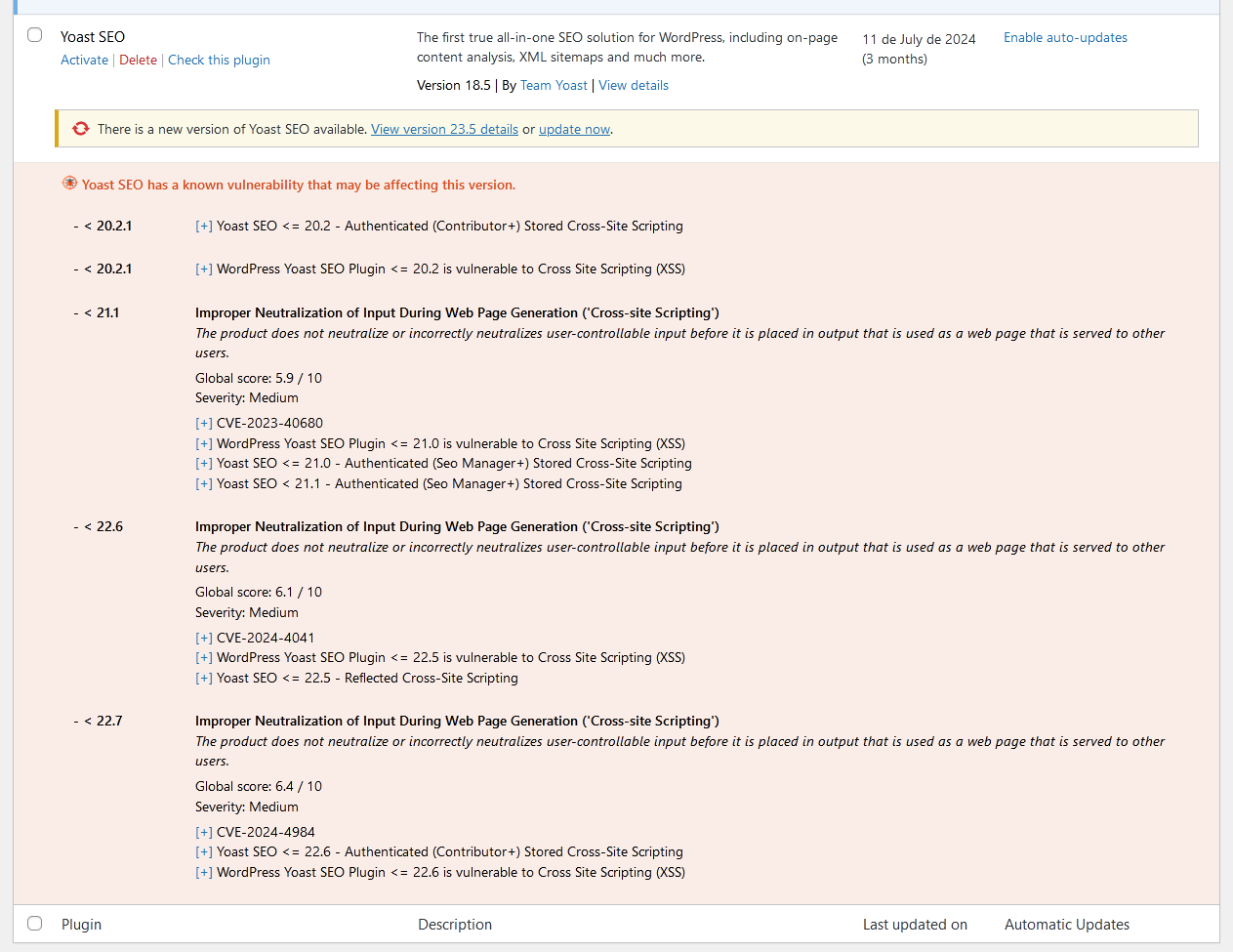

Instalación
Descarga automática
Visita la sección de plugins en tu WordPress, busca [wpvulnerability] y descarga e instala el plugin.
Descarga manual
Extrae el contenido del ZIP y sube el contenido al directorio /wp-content/plugins/wpvulnerability/. Una vez subido, aparecerá en tu lista de plugins.
Preguntas frecuentes
-
¿De dónde procede la información sobre vulnerabilidades?
-
El origen está en la API de WPVulnerability.com. Las vulnerabilidades que aparecen en esta API provienen de diferentes fuentes, como los CVE.
-
¿Se envían los datos de mi sitio a alguna parte?
-
No. Nunca. Tu privacidad es muy importante para nosotros. No comerciamos con tus datos.
-
¿Qué vulnerabilidades voy a encontrar?
-
Vulnerabilities in WordPress Core, Plugins, Themes, PHP, Apache HTTPD, nginx, MariaDB, MySQL, ImageMagick, curl, memcached, Redis, and SQLite are documented.
-
¿Qué hago si mi sitio tiene una vulnerabilidad?
-
First of all, peace of mind. Investigate what the vulnerability is and, above all, check that you have the latest version of the compromised element. We actively recommend that you keep all your WordPress and its plugins up to date. Contact your hosting provider to patch non-WordPress vulnerabilities (like web server, databases, and other software).
Reseñas


Colaboradores y desarrolladores
«WPVulnerability» es un software de código abierto. Las siguientes personas han colaborado con este plugin.
Colaboradores


«WPVulnerability» ha sido traducido a 14 idiomas locales. Gracias a los traductores por sus contribuciones.
Traduce «WPVulnerability» a tu idioma.
¿Interesado en el desarrollo?
Revisa el código , echa un vistazo al repositorio SVN o suscríbete al registro de desarrollo por RSS.
Registro de cambios
[5.1.6] – 2026-08-22
Fixed
- Saving the «Delete all plugin data on uninstall» preference no longer triggers a fatal error (
add_settings_error()was called before the WordPress admin API was loaded). - Notification channels can now be disabled entirely: unchecking every channel and saving previously kept the old channels active, because unchecked checkboxes are never submitted.
- «Reset Plugin» and «Delete all logs» now purge both log stores (API request logs and shell execution audit logs). Previously the shell audit store was never cleaned, and both deletions silently did nothing because the log post types were not registered yet when the actions ran.
- The Debug tab API connectivity tests now use the real API routes: WordPress core collapses pre-release versions (e.g. 7.1-alpha) to their stable milestone, and plugins/themes are tested against their actual slug routes instead of nonexistent plural ones (HTTP 404).
- Component icons now carry explicit width/height attributes and a meaningful alt text. The same icons are embedded in notification emails and Site Health, where the plugin CSS is not loaded and unsized SVGs rendered at their intrinsic 800×800 size.
Changed
languages/wpvulnerability.potregenerated with the new strings.
Compatibility
- WordPress: 4.7 – 7.1
- PHP: 7.0 – 8.5
- WP-CLI: 2.3.0 – 2.12.0
Tests
- PHP Coding Standards: 3.13.6 (0 errors)
- WordPress Coding Standards: 3.4.1
- PHPStan: 2.2.9 (level 9, 0 errors)
- PHPUnit: 9.6.36 (54 tests)
[5.1.5] – 2026-08-22
Changed
- The contributor list now leads with the ROBOTSTXT organization account, followed by Javier Casares; the remaining contributors are unchanged.
- Regenerated
languages/wpvulnerability.potso its source references match the current code. The string set is unchanged (450 strings); all shipped translations were verified against it and remain fully up to date.
Compatibility
- WordPress: 4.7 – 7.1
- PHP: 7.0 – 8.5
- WP-CLI: 2.3.0 – 2.12.0
Tests
- PHP Coding Standards: 3.13.6
- WordPress Coding Standards: 3.4.1
- PHPStan: 2.2.9 (level 9, 0 errors)
- PHPUnit: 9.6.36 (45 tests)
[5.1.4] – 2026-08-22
Highlights
- The Site Health vulnerability tests work again on every WordPress version: they were silently disabled everywhere by an availability gate that could never pass. Secrets are now masked in the admin forms, and compatibility was verified against real PHP interpreters from 5.6 to 8.5.
Fixed
- The Site Health integration registered its tests behind
class_exists( 'WP_Site_Health' ), but core loads that class lazily, afterinit, where the plugin loads its modules — so the guard always evaluated to false and none of the 13 vulnerability tests ever appeared in Site Health. The filter is now registered unconditionally; below WordPress 5.2 it simply never fires. - «Clear all caches» in the debug tools now also deletes the
wpvulnerability-plugins-cache-datatimestamp option, so the plugins dataset is fully refreshed afterwards. - The notification email «From:» address is now sanitized with
sanitize_email()on all code paths. - The plugins list table «Last updated» column decoded the whole plugins dataset for every table row; it is now decoded once per request.
- Removed a duplicated
json_decode()call when reading the vulnerable-themes count. - The
wp_date()compatibility polyfill no longer fatals on WordPress 4.7–5.3: core callswp_maybe_decline_date()unconditionally, but that function only exists since 5.4; the call is now availability-guarded. - The core and software JSON getters return
'[]'instead of an empty string when encoding fails, matching the plugins and themes getters.
Security
- Webhook URLs (Slack, Teams, Discord) and the Telegram bot token are masked in the admin settings forms (single-site and network), showing only their last 4 characters — previously they were rendered in full into the page HTML. The inputs are plain text fields, so masked values never trigger browser URL validation. Saving a form with unchanged masked values keeps the stored secret; clearing a field still removes it.
- Removed the dead
register_uninstall_hook()registration:uninstall.phpsupersedes it and the registration added a stray autoloaded option row. - Single-site settings registrations now explicitly set
show_in_rest => false, matching the multisite configuration.
Changed
- Admin CSS/JS assets load only on the WPVulnerability settings pages, the dashboard and the plugins/themes list tables instead of on every wp-admin screen.
- The shell availability probe (
wpvulnerability_can_shell_exec()) result is cached per request instead of spawning a process on every call.
Compatibility
- WordPress: 4.7 – 7.1
- PHP: 7.0 – 8.5
- WP-CLI: 2.3.0 – 2.12.0
- Verified against real PHP interpreters 5.6.40, 7.0.33, 7.1.33, 7.2.34, 7.3.33, 7.4.33, 8.0.30, 8.1.34, 8.2.33, 8.3.33, 8.4.24 and 8.5.9: every plugin file lints clean from 7.0 up and fails on 5.6, confirming the declared floor. PHPCompatibility gate 7.0-8.5 clean; wp-compat WordPress floor 4.7 clean.
Tests
- PHP Coding Standards: 3.13.6
- WordPress Coding Standards: 3.4.1
- PHPStan: 2.2.9 (level 9, 0 errors)
- PHPUnit: 9.6.36 (45 tests)
Previous versions
If you want to see the full changelog, visit the changelog.txt file.