
Descripción
Este plugin ayuda con una variedad de problemas comunes de accesibilidad que ocurren en los temas de WordPress. Mientras que muchos problemas de accesibilidad no pueden corregirse sin modificar directamente el tema, WP Accessibility incluye un conjunto de utilidades relacionadas con la accesibilidad con un esfuerzo mínimo de configuración o de conocimiento.
WP Accessibility is not intended to make your site compatible with any accessibility guidelines.
Todas las características pueden ser desactivadas según las necesidades de tu tema. Para usuarios avanzados, todas las funciones basadas en la modificación de estilos pueden ser personalizadas usando tus propias hojas de estilo, incluyéndolas en el directorio de tu tema.
Características de accesibilidad del tema añadidas por WP Accessibility
These are features that address issues caused by inaccessible themes.
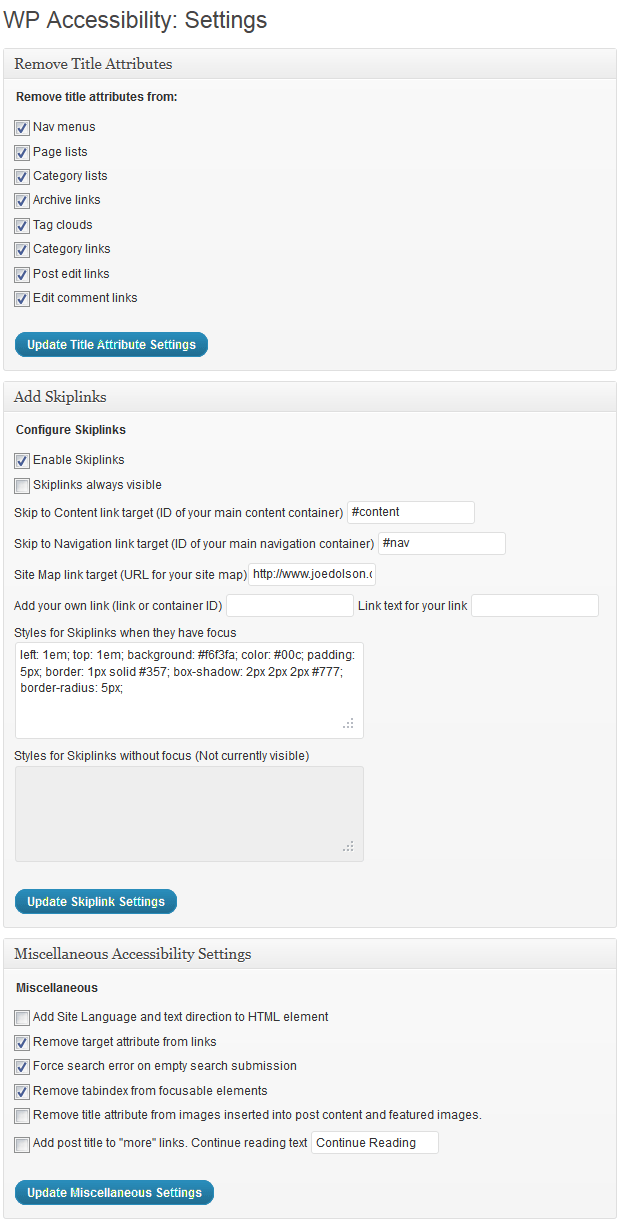
- Añade enlaces de salto configurados por el usuario. (Destinos y apariencia personalizable.)
- Añade atributos de idioma y dirección del texto si falta tu atributo HTML.
- Add an outline to the keyboard focus state for focusable elements.
- Añade una descripción larga a las imágenes. Usa el campo «Descripción» de la imagen para añadir descripciones largas.
- Enforcement for alt attributes on images in the Classic editor.
- Identifica las imágenes sin el atributo «alt» en la biblioteca de medios
- Add labels to standard WordPress form fields (search, comments)
- Add post titles to «read more» links.
- Remove tabindex from elements that are focusable. (Also fixes plugin-caused problems.)
- Remove user-scalable=no to allow resizing.
WordPress Core Accessibility Issues fixed by WP Accessibility
These are features that address issues caused by current or past WordPress core accessibility issues. (Issues added in content, such as target or title attributes, are persistent even when WordPress is updated.)
- Fuerza una página de error cuando una búsqueda se ha hecho con una cadena vacía. (Si tu tema tiene un fichero search.php.)
- Remove redundant title attributes from tag clouds.
- Disable default enabling of full screen block editor.
- Reverse infinite scrolling by default as of WordPress 7.1.
Content specific fixes:
- Strip title attributes from images inserted into content.
- Elimina el atributo ‘target’ de los enlaces.
Herramientas de accesibilidad en WP Accessibility:
These are tools provided to help you identify issues you may need to fix.
- Prueba el contraste de color entre dos colores hexadecimales proporcionados.
- Activa los diagnósticos de CSS para mostrar problemas relacionados con el CSS en el editor visual o en la portada del sitio.
- Search your media library on content in alt text fields.
Learn more! Read about the accessibility issues corrected by WP Accessibility!
Este plugin está pensado para ayudar a resolver los problemas más comunes en temas y en el núcleo de WordPress. No puede corregir cada problema, pero proporciona herrramientas para corregir algunos de ellos complementando la accesibilidad de tu sitio, o te ayuda a identificarlos.
Statistics Collection
WP Accessibility includes a statistics collection feature to help you identify how WP Accessibility is used on your site. This package does not collect any personally identifying data.
Learn more about WP Accessibility statistics.
¡Contribuye!
Capturas
Instalación
- Descarga el fichero comprimido del plugin, extrae su contenido, y súbelo a tu carpeta wp-content/plugins.
- Accede a tu escritorio de WordPress, haz clic en «Plugins», y activa WP Accessibility.
- Personaliza tus opciones en Ajustes > WP Accessibility.
Preguntas frecuentes
-
WP Accessibility añade información via JavaScript. ¿Es realmente accesible?
-
Sí. Requiere que el usuario esté utilizando un dispositivo que tenga soporte de JavaScript, pero es algo que ya prácticamente ocurre en la mayoría de dispositivos y navegadores actuales, incluyendo los lectores de pantalla.
-
He instalado WP Accessibility y ejecutado algunos tests, pero sigo obteniendo errores que supuestamente WP Accessibility ha corregido.
-
Incluso si WP Accessibility está ejecutándose correctamente, no todas las herramientas de revisión de accesibilidad avisarán de los problemas. Aquí se indica un enlace con más información: Mother Effing Tool Confuser.
Reseñas


Colaboradores y desarrolladores
«WP Accessibility» es un software de código abierto. Las siguientes personas han colaborado con este plugin.
Colaboradores
«WP Accessibility» ha sido traducido a 22 idiomas locales. Gracias a los traductores por sus contribuciones.
Traduce «WP Accessibility» a tu idioma.
¿Interesado en el desarrollo?
Revisa el código , echa un vistazo al repositorio SVN o suscríbete al registro de desarrollo por RSS.
Registro de cambios
Future
2.4.1
- Bug fix: Unverified adminbar variable broke font-resizing for public visitors.
2.4.0
- Change: Refactor font resizing to be JS based, resizing all text elements equivalently.
- Remove existing font resizing styles.
- Retain fallback for custom font resizing stylesheets, if present.
- Add promotional notice for WordPress Accessibility Day.
2.3.5
- Reverse the infinite scroll default setting that regresses in WordPress 7.1.
2.3.4
- Feature: Add styling for block editor hover states.
- Feature: Add escape class to ignore alt text toggles:
wpa-skip. - Bug fix: Ignore controls with
aria-hiddenorhiddenattributes when removingtabindexfrom controls. - Design: Update to use new admin colors with fallbacks.
- Docs: Update filter documentation style.
- Docs: Build docs in wiki.
- Add versions to editor styles.
2.3.3
- Bug fix: Set a default option value for
wpa_track_statsin option call, to fix issue caused by strict type checking. - Bug fix: Prevent escaped strings in search output from bypassing empty search checks. Props @stevejonesdev.
2.3.2
- Security: Sanitize alt & longdesc text before injecting into toggle name. Props Wordfence & @jtwings.
- Bug fix: Apply alt text checks to all supported image types. Props @knutsp.
- Change: Add additional invalid alt text patterns.
2.3.1
- Bug fix: Fixes broken longdesc scripting.
2.3.0
- Change: Split settings into three pages: features, admin, and remediation.
- Change: Add settings to disable automatic labelling, viewport settings, lang attributes, and removal of title attributes.
- Change: Remove PHP-based title attribute removals.
- Change: Switch settings markup from lists to paragraphs.
- Change: Add bulk disable to turn off all overlay features.
2.2.6
- Bug fix: Incorrect call to
.removeAttrtriggered catch condition on all URLs, throwing unnecessary console messages.
2.2.5
- Bug fix: Toolbar preference cookies not set.
2.2.4
- Bug fix: Remove
html { will-change: filter }due to Safari/iOS conflicts. - Change: Treat
role="slider"the same asrole="button"for high contrast. - Change: log cases where
hrefis a non-link-like value.
2.2.3
- Change: Support and synchronize multiple toolbars on a single screen.
- Feature: Option to switch the default File block behavior to ‘link’ instead of ‘embed’.
2.2.2
- Bug fix: Rewrite in JS changed the data format sent to the server for stats.
- Bug fix: Incorrect selector for tracking stats on fontsize switcher.
- Bug fix: Internal label in stats incorrect for contrast changes.
2.2.1
- Bug fix: Undeclared variable in JS.
- Bug fix: Incorrect variable used to report errors in console.
- Change: Only add longdesc image block variation if a UI is enabled.
2.2.0
- Feature: Option for automatic insertion of play/pause button on autoplay videos without controls.
- Feature: Automatically pause autoplay videos if prefers-reduced-motion enabled.
- Change: Refactor all front-end JS to remove jQuery dependency.
- Change: Design changes to alt text and long description buttons for consistency.
- Change: Expand focusable element selector list: more thorough, now does not select the a11y toolbar itself.
- Change: Add design CSS for longdesc link.
- Change: Omit buttons with
role="button"from fake button selector. - Change: Keep title attributes on images if they are different from the alt text.
- Change: Also remove target attributes on URL fragments.
- Change: Find non-link elements with
role="link"and make focusable. - Change: Make links using
awithrole="link"and no href focusable. - Change: Add link styles on
role="link". - Bug Fix: Apply grayscale on
htmlelement to prevent shifts in position. - Bug Fix: Modernize screen reader text classes.
- Bug Fix: Change how version number is handled. Automatic updates don’t execute activation, so version wasn’t getting incremented.
2.1.19
- Bug fix: Don’t load admin JS outside of WP Accessibility settings.
- Bug fix: Allow text selection on headings.
- Bug fix: If toolbar custom location is invalid, change attachment to body.
- Change: Remove an extraneous fieldset in settings.
- Change: Change download icon to universal access in stats.
- Change: Set all WP A11y scripts to use the
deferloading strategy.
2.1.18
- Feature: On block themes, add
aria-describedbyto continue reading links to provide expanded context. - Bug fix: Only fetch toolbar bounds when the toolbar is present.
- Bug fix: Use
autorefreshparameter on codemirror field to fix rendering.
2.1.17
- Bug fix: When using the default attachment location, passed empty class to classList.
- Bug fix: When using a custom attachment location, do not adjust scroll position.
2.1.16
- Bug fix: Missed class change caused tooltips to not be shown when display side changed.
- Bug fix: Override fixed positioning if a custom attachment location is set.
- Bug fix: Update longdesc.js minified version, missed in 2.1.14.
- Build tools: Update esbuild targets from edge16 to edge18.
2.1.15
- Bug fix: Wrap block editor assets in
is_admin()conditional to prevent front-end rendering.
2.1.14
- Add Bluesky & set
aria-hiddenon social SVGs. - Fix unclosed
span. - Bug fix fetching ID for alt attribute toggles on pages.
- Disable
h1in block editor by default; add setting to enable. - Add
font-display: swapfor Accessibility icons. - Change
enqueue_editor_block_assetsaction toenqueue_block_assets - Verify that
$browseris an object when rendering browser stats. - Replace
json_encodewithwp_json_encode. - Fix bug with translation used before
init. - Fix duplicate ID in content summary container. Props @ryokuhi.
2.1.13
- Remove textdomain loader and translations. These have been out of date for years.
- Don’t throw an error if ‘ltr’ not set for ‘dir’ attribute, as that is the default value.
- Remove Twitter follow button
- Add updated socials
- Add LinkedIn course
- Update tested to for 6.7.
2.1.12
- Bug fix: Update editor styles to have less impact on block editor styles.
- Bug fix: Log out text was not internationalized.
- Bug fix: Default CSS toggle broken.
- Add: Support for classic editor galleries with alt text warnings.
- Change: Update URLs in various locations to https references.
- Change: New setting to disable admin logout link.
- Update: Misc. minor admin settings design changes.
2.1.11
- Bug fix: Don’t strip target=_blank on Facebook links.
- Change: Minor text change in accessibility stats settings.
- Accessibility: auto-scroll if focus lands on element obsucred by toolbar.
2.1.10
- Bug fix: Fix errors thrown in stats reporting.
- Bug fix: Version the high contrast CSS.
- Bug fix: Add override specificity for block theme colors.
- Change: Update font-resizing values to make changes more consistent.
2.1.9
- Bug fix: Let Google Translate plugin keep title attributes that are used for CSS hooks.
- Bug fix: Don’t double-add ‘#’ in focus color input.
- Change: Use CSS variables for font resizing.
- Feature: Add label fix when
labelelement present but has no text. - Feature: Live Preview support via Playground.
2.1.8
- Update to PHPCS 3
- Fix error thrown if json_decode returns null value.
2.1.7
- Bug fix: Two incorrect placeholder formats in
sprintfcall.
2.1.5, 2.1.6
- Security fix: XSS vulnerability caused by a debugging statement left in place. Props Joshua Bixler.
2.1.4
- Bug fix: Incorrect type check caused most stats to display as ‘no data’.
- Change: Only show first 5 changes on user stats in dashboard.
2.1.3
- Bug fix: Error thrown if a 3rd party is using
the_titlefilters improperly. - Bug fix: Handle case if passed data is invalid.
- Bug fix: Change dashboard widget function name to minimize conflict.
- Bug fix: Setting stats to ‘none’ should fully disable stats collection.
- Bug fix: Ensure that admin status is verified on server side when stats set to ‘admin’.
2.1.2
- Bug fix: Build error caused JS errors when not running in SCRIPT_DEBUG.
2.1.1
- Bug fix: Comparison of new stats to old stats didn’t remove timestamp, so comparison was always false.
2.1.0
- Bug fix: Fix label
forattributes. Props @sabernhardt. - Bug fix: Fix position of image alt attribute warnings.
- Bug fix: Prevent existence of alt warnings from breaking captions.
- Change: Render toolbar location relatively instead of absolutely.
- Change: Improve alt text tests.
- Change: Record count of occurrences for fake button/link tests.
- Change: Set
wpa_langoption to on by default. - Change: Switch auto labeling to always one.
- Change: Switch skiplink CSS to use default by default.
- Change: Remove setting for filtering title attributes and turn on by default.
- Change: Consolidate and minify JS.
- Feature: Add stats collection to provide view into what WP Accessibility is doing.
2.0.1
- Add
.et_smooth_scroll_disabledto skip links to override Divi’s inaccessible smooth scrolling. - Add promotional affiliate links for Equalize Digital’s Accessibility Checker
2.0.0
- New feature: Show alt attributes toggle on content images.
- New feature: Ensure users can adjust scale even if maximum-scale set to 1.0.
- New feature: Alt enforcement indicators now present in block editor.
- New feature: Flag missing captions or subtitles in uploaded videos in editor.
- Updated feature: Remove title attributes now more intelligent.
- Updated feature: Modernized alt attribute enforcement tools.
- Change: Combine remediation scripting in wp-accessibility.js.
- Change: Disable accessibility-ready duplicating features if theme changed to accessibility-ready.
- Bug fix: aria-expanded missing in some cases for longdesc disclosures.
- Bug fix: Main JS file did not have a version number.
- Bug fix: Run feature JS after running remediation JS.
- Bug fix: Fix DOM ordering with image disclosure buttons.
- Retired language directory call. Translation files haven’t been updated since version Oct 2014.