
Descripción
Fixlight is a free add-on for WordPress, called a plugin. It helps with accessibility. That means people who can’t see or use a mouse can still use your site. Fixlight checks your pages for common problems. It fixes the ones that are safe to fix. Then it tells you in plain words what still needs a person.
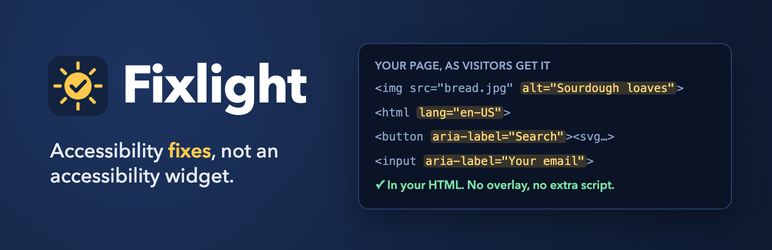
It is not an overlay. An overlay is a widget that changes a site after it loads. Fixlight adds no toolbar and no widget. It adds no script for your visitors. It fixes the HTML your site sends. HTML is the code of each page. So the fixes work for screen readers, keyboards and search engines. A screen reader reads the page out loud. The fixes keep working when JavaScript is off.
No account, no limits. You never need to sign up to use any of it. There are no page limits and no visit caps. There is no trial period.
What it fixes on its own
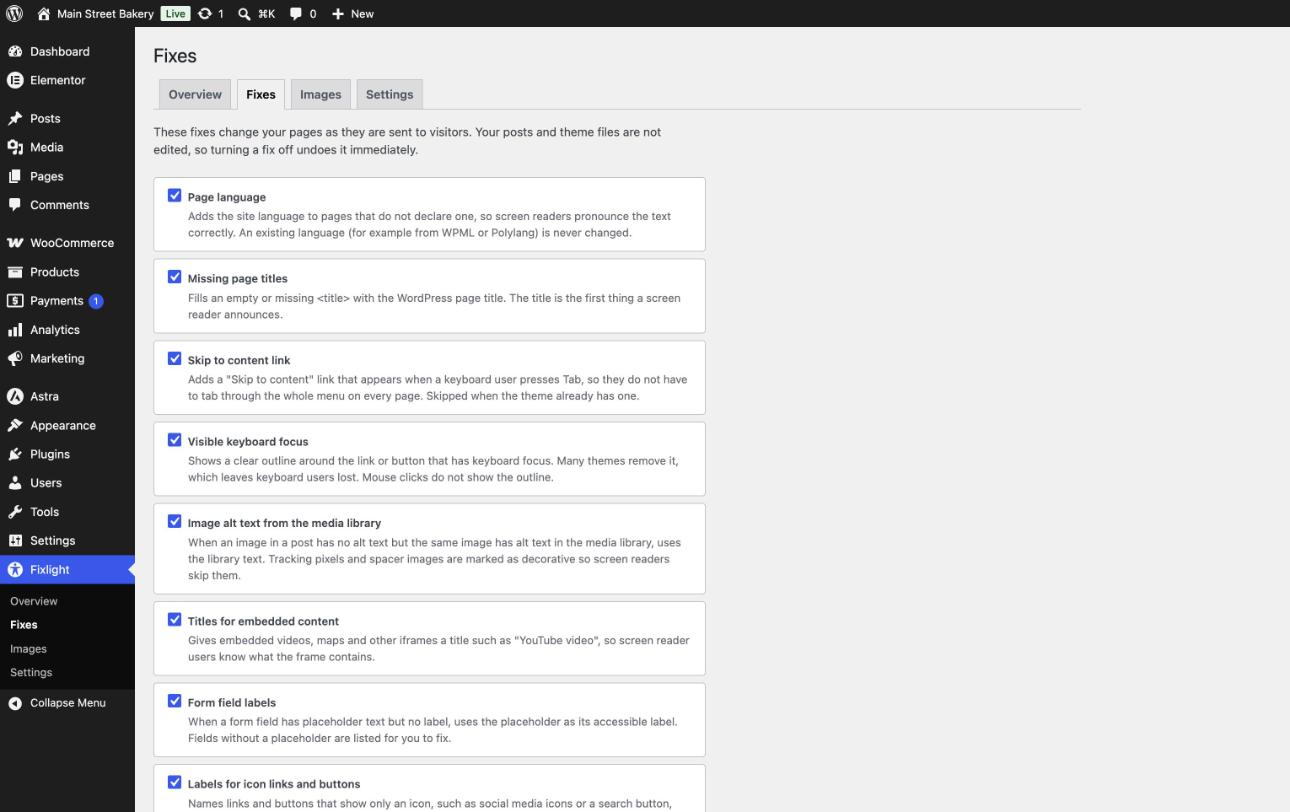
Each fix has its own switch. When you turn one off, it is undone right away. It never edits your posts or theme files.
- The page language, when the theme does not set one
- Empty or missing page titles
- A «Skip to content» link for keyboard users. It is added only when the theme has none.
- Names for menus, sidebars and search forms. Screen readers may not tell them apart. This fix runs only when a page has two or more of one kind.
- Your header, main content and footer marked as page regions. This happens when the theme leaves them out. A second header or footer is no longer counted twice. Nor is one inside the other.
- Lists that screen readers would read out wrong. One case is list items outside a list. One more is a list wrapped in a list.
- Hidden labels that leave out the text a link or button shows
- Code that points to parts of the page that don’t exist
- Unnamed icons inside links and buttons that have a name
- Labels in places screen readers may skip. They are moved or given a role.
- A clear outline that shows keyboard users where they are
- Alt text on images in posts, copied from the media library. Alt text tells people who can’t see what a picture shows.
- Tracking pixels and spacers marked as decorative. Then screen readers skip them.
- Unnamed background pictures. They get a name from the media library. Or they are marked as decorative.
- Alt text that only repeats the link it sits in. It is marked the same way. One case is an author photo next to the name.
- Titles for videos, maps and other iframes in your pages
- Labels for form fields that only have a hint inside them. That hint is the placeholder text.
- Names for dropdowns that have none
- Labels for icon-only links and buttons. Some cases are social, search, menu and cart icons.
- Empty links to your own pages get that page’s title. One case is a post’s picture.
- Menu arrows and other icons made into buttons get names too
- Headings that read in order. An empty heading is no longer read out. A page with no main heading gets its title heading as the main one. A heading that skips a level is read out at the next level. Nothing changes on screen.
- «Read more» links that say which post they lead to
- Code that mixes up the order of the Tab key (positive tabindex)
- Warnings for links that open a new tab or a PDF
- Zoom blocked on phones
- Play and pause controls for sound and video that play on their own
- Captions: upload a captions file (.vtt) next to a video. It is added to the video. Then people can turn captions on.
- Moving effects stopped for people who ask their device for less motion
- Contrast colours, if you turn it on. Text too faint for its background is made a bit darker or lighter. It gets the nearest shade of the same colour that passes. The colours come from what the browser check finds. You see each change before you turn it on. You can keep any colour as it is.
- Bigger tap areas, if you turn it on. Controls smaller than 24 by 24 pixels get at least that size. Some cases are category badges, slider dots and small icon buttons.
- Underlined links in text, if you turn them on. They help people who can’t tell colours apart.
- Theme and plugin fixes for Divi (4 and 5), Extra, Bloom and Monarch. Their mobile menus and search icons work with the keyboard. So do their toggles and close buttons. Submenus open when the keyboard reaches them. Their icon links and share buttons get names.
What it checks
- Key pages, in your browser: Fixlight tests your home page and pages that changed lately. It uses axe-core, an open-source engine. Most tools that test for these problems use it. It checks colour contrast too.
- The whole site, on your server: Each published page is checked once a week. It checks a few at a time. Each page is checked again after you update it.
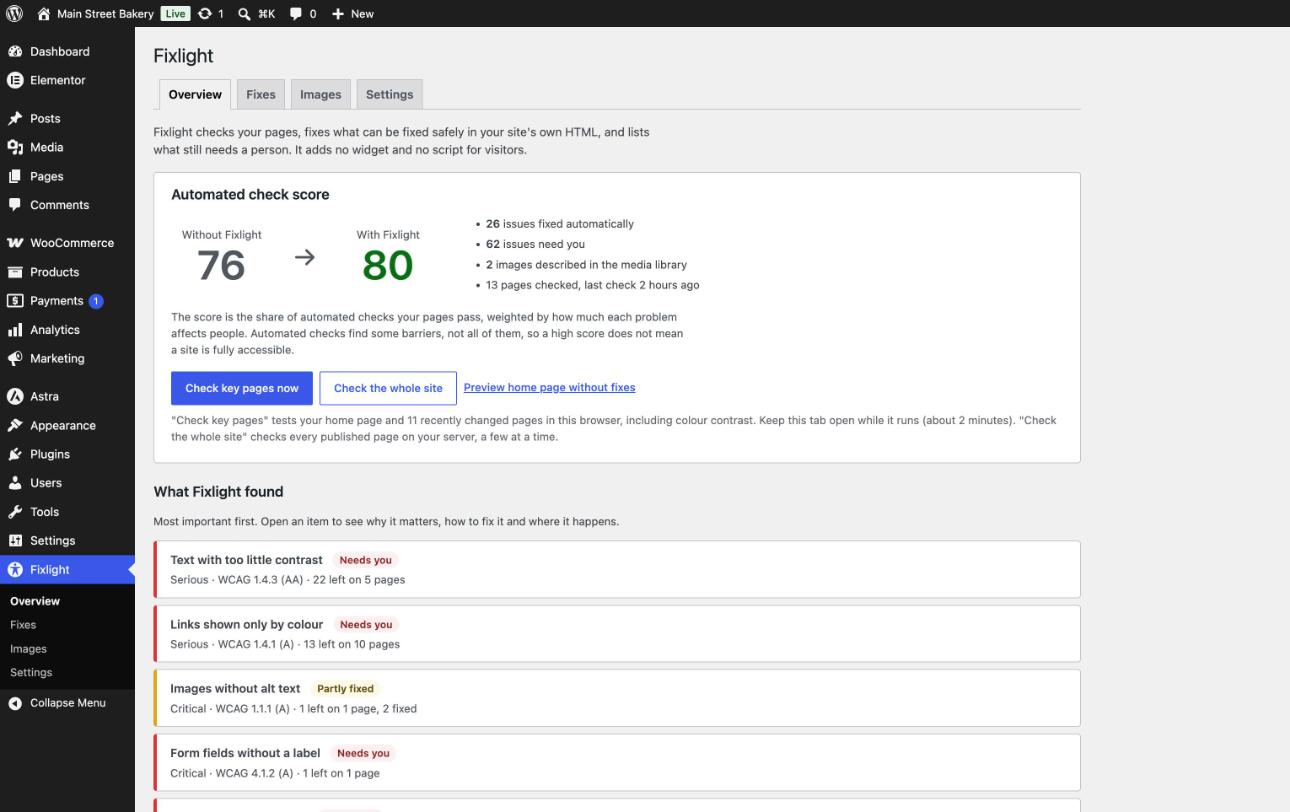
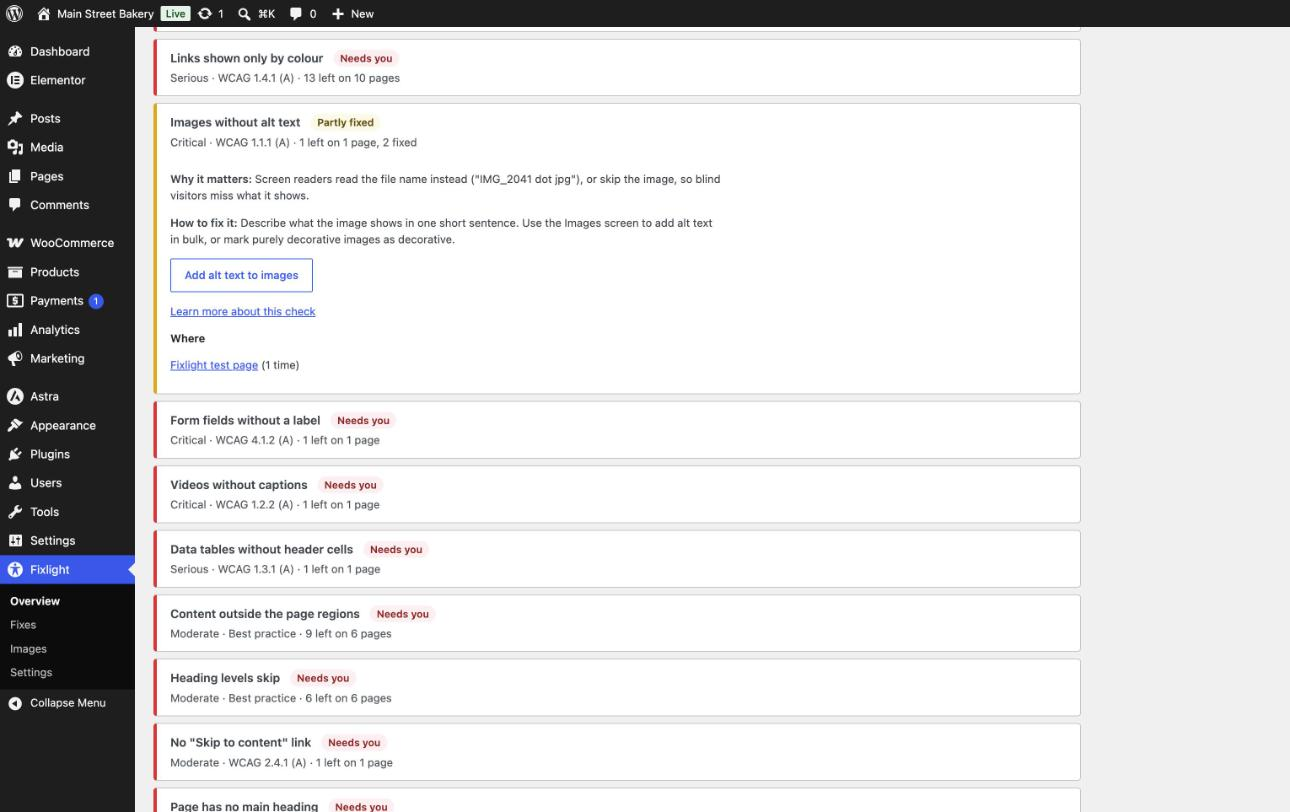
You see a score with and without Fixlight. You see how many problems were fixed. You also get a list of what is left. The worst come first. Each item says why it matters and how to fix it.
Image alt text
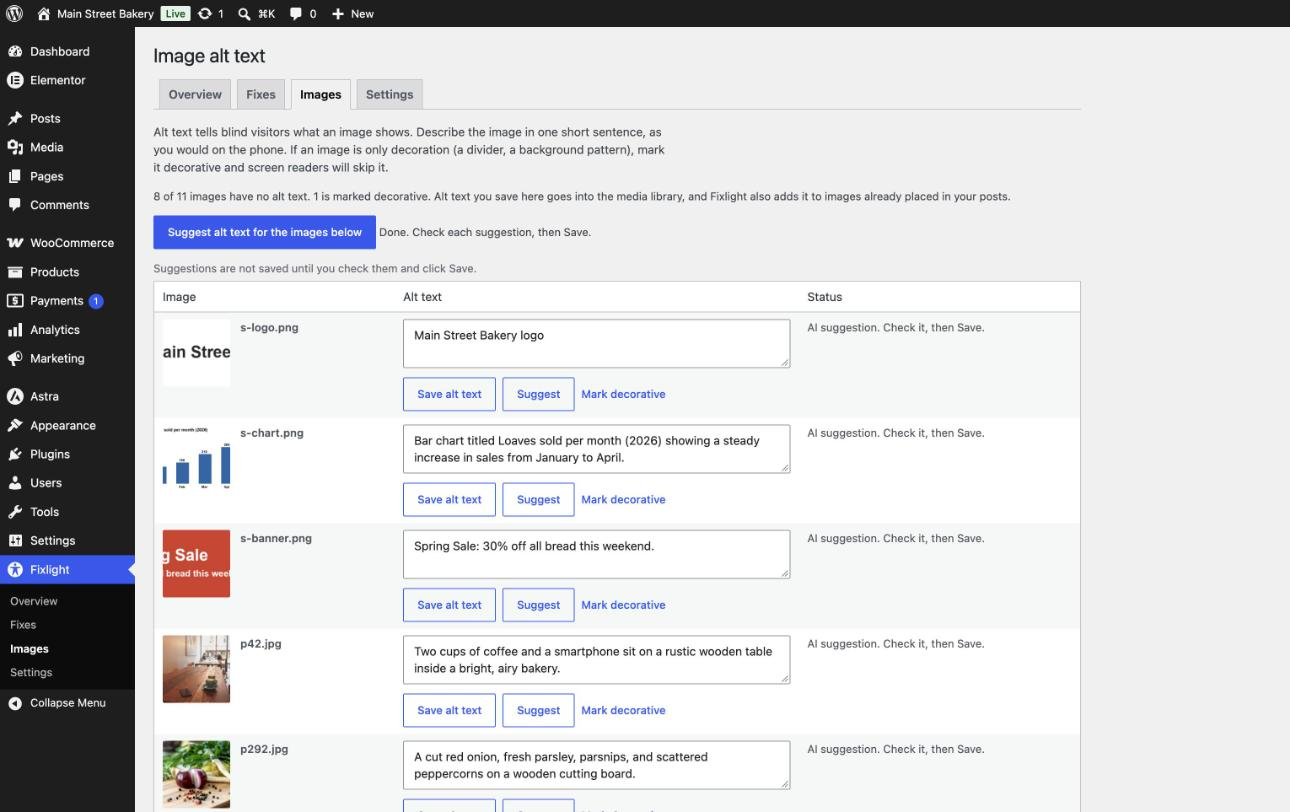
Open the Images screen. It lists each picture in your media library with no alt text. Describe each one, or mark it decorative. The alt text is saved in WordPress itself. So it stays if you ever remove Fixlight.
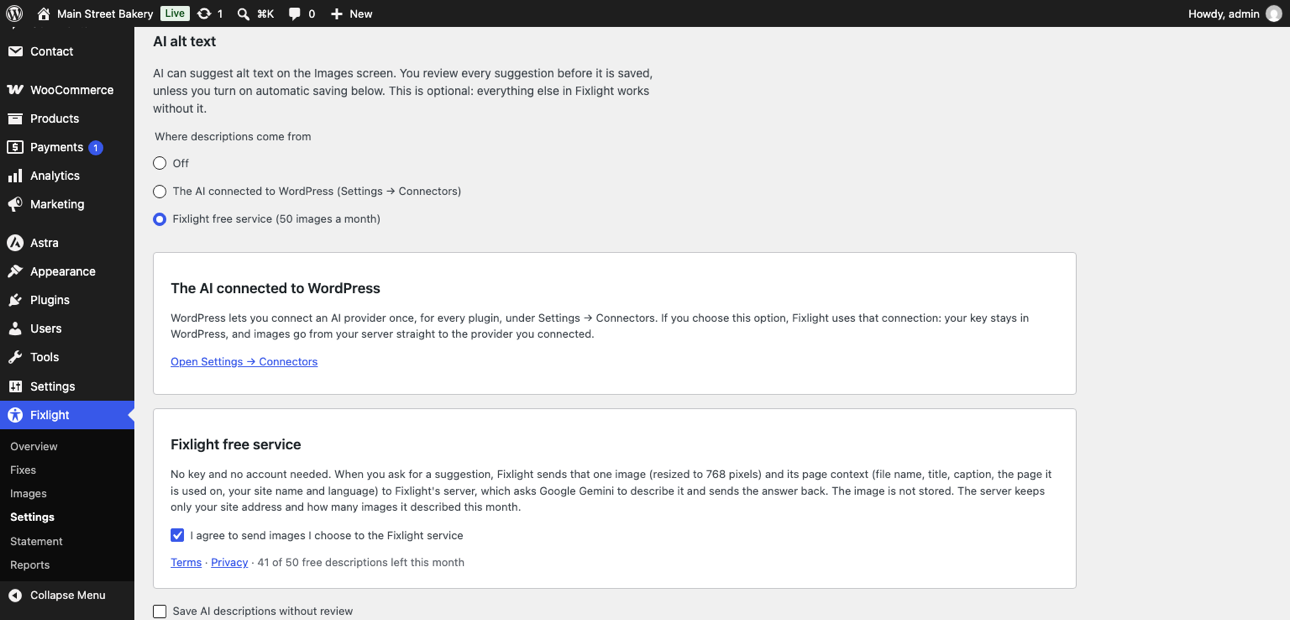
If you want, AI can write a first draft. You check it. AI is a computer program that can write. Fixlight’s service gives you 50 free images per site per month. Or use the AI you connected to WordPress. Then there is no limit. That needs WordPress 7 or later (Settings Connectors).
Accessibility statement and barrier reports
In Fixlight Statement, fill in a few details. Then publish a statement page with one click. It says what your site aims for and what Fixlight does. It also says how to reach you. It never says that your site meets a law or standard.
The page has a short form. People can use it to tell you about a barrier. A barrier is something that stops them from using your site. You can also put the form in other places. Use the [fixlight_report_form] shortcode.
Reports are saved in your site’s own database. They are emailed to the contact address you set too. At most 10 emails go out an hour. But each report is still listed. You see them in Fixlight Reports.
The form has no CAPTCHA, the «prove you are human» test. A CAPTCHA is a barrier itself. The form never stores people’s IP addresses. Instead, it keeps a one-way code made from the address. It keeps it for one hour. This limits repeat sends. Reports stay until you delete them. WordPress’s Export and Erase Personal Data tools include them. They find them by email address. Fixlight also adds text to WordPress’s privacy policy guide. You can use it.
For developers
wp fixlight scanchecks every published page from the command line. Andwp fixlight statusshows the results.- The
[fixlight_statement]shortcode builds the page. Thefixlight_statement_sectionsfilter can add sections to it. Their HTML is filtered with wp_kses: post tags plus form fields.
Honest about what it can do
No plugin can make a site fully accessible on its own. Checks that run on their own find only some of the barriers people meet. Fixlight fixes what is safe to fix. It shows you the rest. It does not claim that your site meets any law or standard. It is not legal advice. Test with a keyboard and a screen reader too.
External services
Fixlight needs no outside service. The alt text services below are off at first. They work only if you turn on AI alt text. You do that in Fixlight Settings. Even then, they run only when you click Suggest. That button is on the Images screen. Apart from that, the plugin talks to fixlight.fernwaylabs.com for one thing only. It sends anonymous statistics, if you turn them on.
Fixlight alt text service (fixlight.fernwaylabs.com)
Used when you choose «Fixlight free service» and tick the consent box.
The first time, the plugin sends your site address. It also sends the plugin version. It does this to get a token for your site. It sends them again only if that token stops working.
Each time you click Suggest, it sends that one image. The image is resized to at most 768 pixels. It also sends these details with the image:
- the file name, image title and caption
- the title of the page it is used on
- your site name and your site language
The service passes the image to Google’s Gemini API. Then it sends the alt text back. It never stores the image or the text.
It does store these things:
- your site address
- a one-way hash of your site’s token
- monthly usage counts
- a daily count of requests per network, to stop abuse
A one-way hash can’t be undone. The daily count uses a salted one-way hash of the IP address. That hash changes every day.
- Fixlight terms: https://fixlight.fernwaylabs.com/terms/
- Fixlight privacy: https://fixlight.fernwaylabs.com/privacy/
- Google Gemini API terms: https://ai.google.dev/gemini-api/terms
- Google privacy policy: https://policies.google.com/privacy
Anonymous statistics (only if you turn them on)
This is off unless you turn it on. You find it in Fixlight Settings Anonymous statistics. Fixlight never asks you to.
While it is on, the plugin sends these to fixlight.fernwaylabs.com once a week:
- how many problems of each kind it found and fixed
- which of its fixes are on
- your theme’s folder name
- your page builder
- whether WooCommerce is on
- the Fixlight, WordPress and PHP versions
- a random id made when you turned sharing on
The id is erased when you turn sharing off. Each week’s numbers replace the last week’s. It never sends your site’s address, your pages or your content. It sends nothing about your visitors. We publish only totals across at least five sites. We never publish one site’s numbers.
- Fixlight privacy: https://fixlight.fernwaylabs.com/privacy/
Links to fixlight.fernwaylabs.com
Two links point to fixlight.fernwaylabs.com/go/. That address counts the visit and sends the visitor on:
- The credit link on your statement page. It is off unless you turn it on. It leads to Fixlight’s free site check.
- The link in the More help card. You can send it to an agency. It leads to Fixlight Pro.
Nothing is sent unless someone clicks one. The count keeps only how many people came from each link per day. To count each person once, it uses a salted one-way hash. The hash is made from the IP address. That hash changes every day. It is deleted after two days.
The site itself loads Meta’s ad pixel on its public pages. It loads only for visitors in the United States. It never loads on the free site check, where the credit link goes. The privacy page says how to turn it off.
- Fixlight privacy: https://fixlight.fernwaylabs.com/privacy/
The AI connected to WordPress (WordPress 7.0 and later)
Used when you choose «The AI connected to WordPress». The image and details above go from your server to your AI service. You pick it in Settings Connectors. Its terms apply. Fixlight’s server is not involved.
Third-party code
Fixlight includes axe-core 4.14.0 by Deque Systems. Its license is the Mozilla Public License 2.0. The bundled file is assets/vendor/axe-core/axe.min.js. It is the project’s release build, not changed in any way. Its source code is at https://github.com/dequelabs/axe-core/tree/v4.14.0. The license file is in assets/vendor/axe-core. It runs only on Fixlight’s own check pages. It never runs for people who visit.
Capturas
Instalación
- Install Fixlight from the Plugins screen, then click Activate.
- Go to Fixlight Overview and click Check key pages now.
- See what Fixlight fixed and what still needs you. Turn each fix on or off in Fixlight Fixes.
Preguntas frecuentes
-
What’s the cheapest way to fix WCAG issues on WordPress without a developer?
-
Install Fixlight. It is free, with no account and no page limit. It finds WCAG issues on your pages. It fixes many common ones on its own, in the code of each page. You don’t need a developer for those. It lists the rest, with steps to fix each one. Some fixes still need a person, like good alt text.
-
Which WordPress plugin generates an accessibility statement page?
-
Fixlight does, for free. It makes a basic accessibility statement page for your site. The page has a form. Visitors can use it to report a barrier. Reports stay in your own database. Your own site emails them to you.
-
What is a free WordPress accessibility plugin that fixes issues instead of adding an overlay?
-
Fixlight is one. An overlay is a widget or toolbar on top of your pages. Fixlight adds no widget or toolbar for visitors. It fixes the code of each page as WordPress sends it. Each fix can be turned off on its own.
-
How do I fix missing alt text and low contrast on a WordPress site automatically?
-
Fixlight copies alt text from your media library into your posts. It can also suggest alt text with AI. You check each one before you save it. For low contrast, turn on «Contrast colours». Then Fixlight fixes text with too little contrast. You see each change before you turn it on.
-
Will this make my site ADA or WCAG compliant?
-
No plugin can promise that. The ADA is a US law. WCAG is a set of rules for making sites everyone can use. Fixlight fixes common problems in your HTML. It helps you find the rest. But your content and your design matter too. So does how people really use the site. Fixlight never claims that a site meets a law or standard.
-
Does it slow my site down?
-
The fixes run while WordPress sends a page. They take about 2 milliseconds on a typical page. Visitors get no extra scripts. If you use a page cache, the cache keeps the fixed page.
-
Does it work with my theme and page builder?
-
Fixlight works with the HTML your site makes. So it works with block themes and classic themes. It works with Elementor, Divi, WooCommerce and most other plugins. It never changes a page while you edit it in a page builder. That includes the Divi Builder.
It also has fixes made for Divi 4 and 5, Extra, Bloom and Monarch. They run only when that theme or plugin is on. You can turn them off in Fixlight Fixes. Some of their problems need a change in the theme’s own code. One case is sliders built by JavaScript. Fixlight lists those for you instead. Text with too little contrast can be fixed with the Contrast colours switch. That switch is off until you turn it on.
-
Does it send my data anywhere?
-
Not unless you turn on AI alt text or anonymous statistics. Checks and fixes run in your browser and on your own server.
Alt text says what a picture shows. AI is a computer program that can write it. With AI alt text on, the images you ask about are sent out. They go to the service you choose. With statistics on, Fixlight sends counts. They show what it found and fixed. It sends them once a week. See «External services» below.
Barrier reports from your statement page stay in your own database. They are emailed from your own site.
-
How does AI alt text work?
-
On the Images screen, click Suggest. You can also ask for a whole page of images at once. The AI writes short alt text in your site’s language. You check it before saving.
Choose Fixlight’s free service: 50 images per site per month, with no account. Or choose the AI you connected to WordPress. You connect it in Settings Connectors. That needs WordPress 7 or later. It has no limit. Your provider bills you for it.
You don’t have to use AI. You can always write alt text yourself. Nothing else in Fixlight needs it.
-
What happens if I deactivate it?
-
The fixes stop at once. Your site goes back to just how it was. Alt text you added on the Images screen stays. It is stored in WordPress itself.
-
Can I see my site without the fixes?
-
Yes. Log in as an admin. Then use Preview home page without fixes. It is on the Overview screen. Or add
?fixlight_off=1to any page address.
Reseñas
No hay reseñas para este plugin.
Colaboradores y desarrolladores
«Fixlight – Accessibility Checker & Fixer» es un software de código abierto. Las siguientes personas han colaborado con este plugin.
Colaboradores
«Fixlight – Accessibility Checker & Fixer» ha sido traducido a 1 idioma local. Gracias a los traductores por sus contribuciones.
Traduce «Fixlight – Accessibility Checker & Fixer» a tu idioma.
¿Interesado en el desarrollo?
Revisa el código , echa un vistazo al repositorio SVN o suscríbete al registro de desarrollo por RSS.
Registro de cambios
0.1.7
- Fixed: turning a fix off now also clears WP-Optimize’s page cache. People get the change on their next visit. Before, they could get an old cached page for up to a day. Hummingbird’s page cache is cleared too.
- Fixed: turning Fixlight back on clears your page cache. So pages cached while it was off get their fixes back right away.
- Thanks to PeepSo for the idea of a warm page cache test.
- That test found two cache gaps. Version 0.1.7 fixed both.
- One was in WP-Optimize’s cache. One came when you turn Fixlight back on.
0.1.6
- New: «Contrast colours» (off by default). Text too faint for its background is made a bit darker or lighter. It gets the nearest shade of the same colour that passes. Passing means a contrast of 4.5:1, or 3:1 for large text.
- The colours come from the browser check («Check key pages»). Each change applies only on the pages where the check saw it. Before you turn it on, the Fixes screen lists each change. Each change has a box to keep that colour as it is.
- New: «Bigger tap areas» (off by default). The browser check finds controls smaller than 24 by 24 pixels. They get at least that size. Some cases are category badges and slider dots.
- New: «Headings that read in order». An empty heading is no longer read out. A page with no main heading gets one. It is the heading that matches its title. A heading that skips a level is read out at the next level. Nothing changes on screen.
- New: «Captions files for videos». Give a captions file (.vtt) the same name as a video. Then it is added to that video. This works for videos in the media library.
- Improved: dropdowns with no label get a name.
- Improved: menu arrows and other icons made into buttons get names.
- Improved: labels put where screen readers may skip them are kept.
- Improved: unnamed background pictures get their media library text. Or they are marked as decorative.
- Improved: a second page header or footer is no longer counted twice.
- Improved: alt text that only repeats its link is marked as decorative.
- The new fixes that change nothing on screen are on by default. Each has its own switch on the Fixes screen.
0.1.5
- New: «Header, content and footer regions». Some themes don’t mark their header, main content or footer as a page region. Then Fixlight marks the parts the theme uses for them. So screen reader users can jump straight to each one.
- New: «Lists that read right». Some lists would be read out wrong by screen readers. One case is list items outside a list. One more is a list wrapped in a list. It repairs them with roles. The HTML is not moved.
- New: «Broken labels and references». Some hidden labels leave out the text a link or button shows. They are removed. Voice control users say what they see. It also removes code that points to missing parts of the page. Some unnamed icons sit inside named links and buttons. It removes their image role.
- All three are on by default. They change nothing on screen. Each has its own switch on the Fixes screen.
- Improved: «Labels for icon links and buttons» now names more links. An empty link to a page on your site gets that page’s title. One case is a post’s picture. The title comes from some other link to the same page. Or it comes from WordPress.
- Changed: some content areas also hold the header, footer or sidebar. The «Skip to content» link no longer marks such an area as the main region.
0.1.4
- New: «Names for menus and page regions». A page may have two or more menus, sidebars or search forms. If screen readers can’t tell them apart, Fixlight names each one. The name comes from a heading inside it. Or it comes from the menu’s location or name in WordPress. Or from its widget area. Or from where it sits (header, footer, sidebar). Nothing changes on screen. It is on by default. It has its own switch on the Fixes screen.
- New: the checks now list «Page regions that cannot be told apart».
0.1.3
- Changed: the plugin’s name on WordPress.org is now «Fixlight – Accessibility Checker & Fixer». Nothing else about the plugin changes.
- Changed: when you publish the statement page, you see a checkbox. It adds the credit link at the end of the page. The box is not ticked. The link stays off unless you tick it. It is never shown on sites running Fixlight Pro. The link now leads to Fixlight’s free site check.
0.1.2
- New: Fixlight knows four widgets. They are accessiBe, UserWay, AudioEye and Elementor’s Web Accessibility. If your site runs one, the Overview says so. It links to step-by-step guides for switching.
- Fixlight can turn off the widget’s own plugin. It asks you first. It never edits code pasted into your theme. It doesn’t end your plan with the widget’s maker. Also on the command line: wp fixlight overlays.
- New: anonymous statistics. Find them in Settings. They are off unless you turn them on. Fixlight never asks you to. See External services.
0.1.1
- New: an «Accessibility fixes by Fixlight» link. It goes at the end of the statement page. It is off unless you turn it on (Statement Credit).
- New: Fixlight’s screens ask once if you would write a review. They ask only after it has fixed something. You must also have used it for a few days. You can put it off or turn it off for good.
- New: a link to send to the agency that looks after your site. It is in the Overview’s More help card.
0.1.0
- First release. It has page checks in the browser and in the background.
- Fixes that run on their own.
- Fixes for Divi, Extra, Bloom and Monarch.
- The Images screen, with AI drafts of alt text if you want them.
- The statement page, with a form to report a barrier.
- The Reports screen. WordPress’s privacy tools can export or erase the reports.
- WP-CLI commands for the command line.