
Descripción
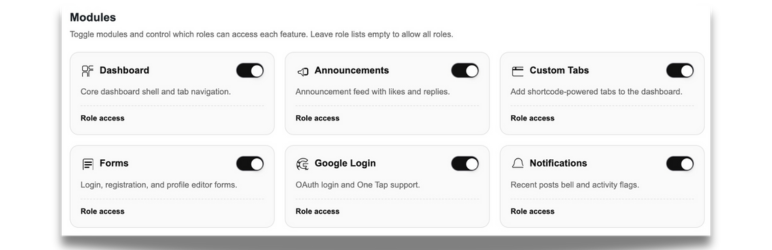
Blocdash is a modular dashboard framework for WordPress block themes. Enable only the features you need and control access by role. It includes frontend login/register/profile forms, an announcements feed with likes and replies, and optional Google OAuth login.
External services
This plugin can connect to Google services when the optional Google Login and/or One Tap features are enabled.
Service: Google OAuth / Google Identity Services (One Tap)
What it is used for: Allow users to authenticate with their Google account on the front-end login flow.
What data is sent and when:
– When a user initiates Google Login or One Tap, their browser loads Google’s Identity Services script and is directed to Google for authentication.
– The site sends the OAuth authorization code, client ID, and client secret to Google’s token endpoint to obtain an access token.
– The access token is then sent to Google’s userinfo endpoint to retrieve the user’s profile details (such as email address, name, and Google user ID) required to sign them in or create a WordPress account.
Terms of service: https://policies.google.com/terms
Privacy policy: https://policies.google.com/privacy
Privacy
If Google Login or One Tap is enabled, the plugin sends requests to Google OAuth endpoints to authenticate users. No other external services are contacted by default.
Instalación
- Upload the plugin folder to
/wp-content/plugins/. - Activate Blocdash in the Plugins menu.
- Visit the Blocdash admin hub to enable modules and configure settings.
Preguntas frecuentes
-
Does Blocdash create pages automatically?
-
Yes. On activation it can create Dashboard, Login, Register, and Profile pages. You can disable this via the
blocdash_create_default_pagesfilter. -
Can I disable modules?
-
Yes. Use the Modules tab in the admin hub to enable or disable each feature.
-
How do I enable account deletion from the profile editor?
-
Go to Blocdash Register Form Account Management and enable «Allow users to delete their own account.» The delete option appears in the profile editor for non-admin users.
-
How do I enable reply badges and reply deletion?
-
Enable replies in Blocdash General Announcements, then toggle «Allow users to delete their own replies.» Badges appear when new replies are posted since your last visit.
-
Can admins delete their own accounts or reassign posts on delete?
-
Yes. Use the filters below in a custom plugin or your theme’s
functions.php:`add_filter( ‘blocdash_allow_admin_account_delete’, ‘__return_true’ );
add_filter( ‘blocdash_account_delete_reassign’, function( $reassign_id, $user_id ) {
return 1; // Reassign posts to user ID 1.
}, 10, 2 );
`
Reseñas
No hay reseñas para este plugin.
Colaboradores y desarrolladores
«Blocdash – Backend Dashboard Toolkit» es un software de código abierto. Las siguientes personas han colaborado con este plugin.
Colaboradores
Traduce «Blocdash – Backend Dashboard Toolkit» a tu idioma.
¿Interesado en el desarrollo?
Revisa el código , echa un vistazo al repositorio SVN o suscríbete al registro de desarrollo por RSS.
Registro de cambios
1.0.1
- Security: sanitize password reset inputs and escape announcement author output.
- Security: fix JS-context encoding for Google One Tap login URI.
- I18n: align text domain with plugin slug across PHP and block registration.
- Docs: document Google external services usage.
1.0.0
- Initial release.