

Descripción
Smart COD for WooCommerce extends the WooCommerce Cash on Delivery (COD) Gateway with an optional extra fee and restrictions based on customer conditions such as location and selected shipping method.
Whether you’re managing a small shop or a large e-commerce business, this plugin helps you fine-tune your Cash on Delivery service to cater to a wide range of scenarios and requirements.
A common challenge faced by WooCommerce store owners is the inability to apply an extra fee for the Cash on Delivery (COD) payment method. This is a critical feature for many e-commerce shops, as charging an additional fee for COD is a standard practice.
The plugin also offers configurable restrictions so merchants can decide when COD is available.
A separate Smart COD PRO plugin is available outside the WordPress.org directory. It adds advance-payment COD, multiple conditional extra fees (including country, shipping-zone and shipping-method pricing, cart-amount thresholds and order-pay handling), CSV restriction imports, and cart amount, product quantity, customer-role, stock, backorder and coupon rules. These features are part of the separate PRO plugin, not locked options in this Free plugin.
Restrictions
Each restriction can be easily toggled between Enable and Disable. When set to Enable, the restriction will allow the Cash on Delivery (COD) payment option only for the specified selections. On the other hand, when set to Disable, the restriction will disable the COD option for the specified selections, making it unavailable for them.
- Shipping Zone
- Shipping Method inside Shipping Zone
- Country
- State
- Postal Code (Supports Ranges)
- City
- User Role
- Products in cart (Supports Variations)
- Categories of the products in cart
- Shipping Class
You can define an informational message to display before the payment methods, when the COD method is not available for a customer.
You can define different messages per restrict reason.
Extra Fees
You can configure a standard extra fee and a separate fee for local pickup.
You can use a fixed price or a percentage of the customer’s cart amount.
You also have a nice rounding option.
You can enable tax for this fee.
Developer-Friendly
The plugin integrates seamlessly with WooCommerce and uses a clean, object-oriented codebase. It also provides the following filters for easy customization:
wc_smart_cod_fee: Alter the extra fee.wc_smart_cod_available: Alter the current COD restriction.wc_smart_cod_fee_title: Change the COD fee title.
Since the plugin extends the existing WooCommerce Cash on Delivery Gateway, there’s no need to enable or disable gateways manually.
External services
COD Protection and cancelled COD data sharing are optional and off by default. Only after an administrator explicitly enables the option in the Cash on Delivery settings, Smart COD connects to api.woosmartcod.com. It registers the installation and sends eligible historical and future cancelled COD events in small background batches. Registration includes a generated installation identifier, shop domain, operating country and public signing key. Events can include pseudonymized customer and location identifiers, a non-reversible order reference, cancellation time, order amounts/currency and shipping information, including courier name and tracking code where available. An event may also include a capped count of earlier completed COD orders with tracking for the same shopper at that shop. The external service validates signed submissions, deduplicates events, applies an additional secret-keyed transformation to identity tokens, and stores evidence from participating shops for country-level analysis. No individual shop could perform that cross-shop processing locally.
When COD Protection is enabled and checkout contains an email address or telephone number, the plugin sends locally generated SHA-256 identity tokens, the installation identifier and operating country to the COD Protection endpoint. Raw email and telephone values are not sent. The service checks only eligible events belonging to that same installation and returns an allow/disable signal and a capped shop-local match count. The service does not persist checkout lookup requests or create a checkout customer profile. A timeout, invalid response or unavailable service leaves Cash on Delivery available. Turning the option off stops future collection, transmission and checkout lookups. The plugin does not call courier APIs.
Service information: cancelled COD service privacy details, Terms and Conditions and Privacy Policy.
Capturas
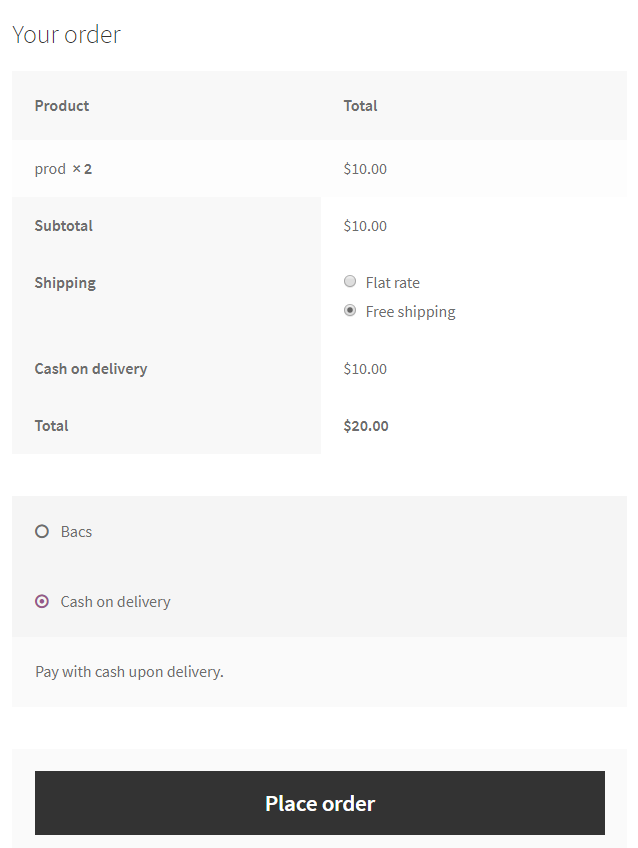
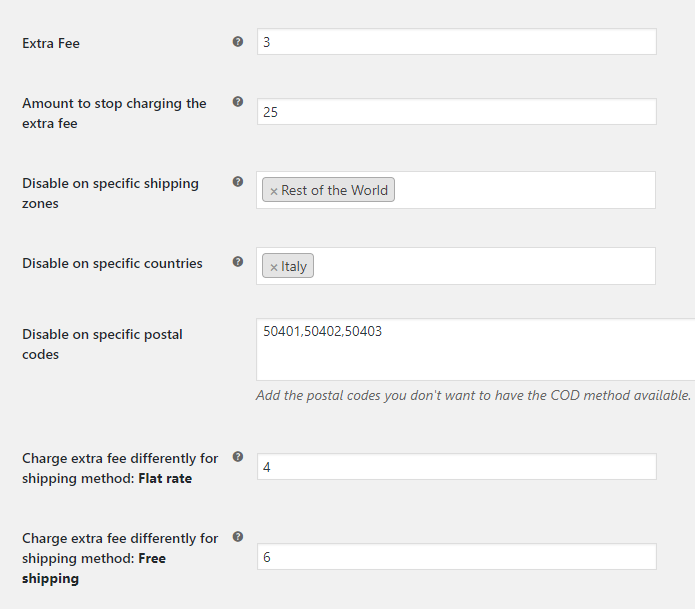
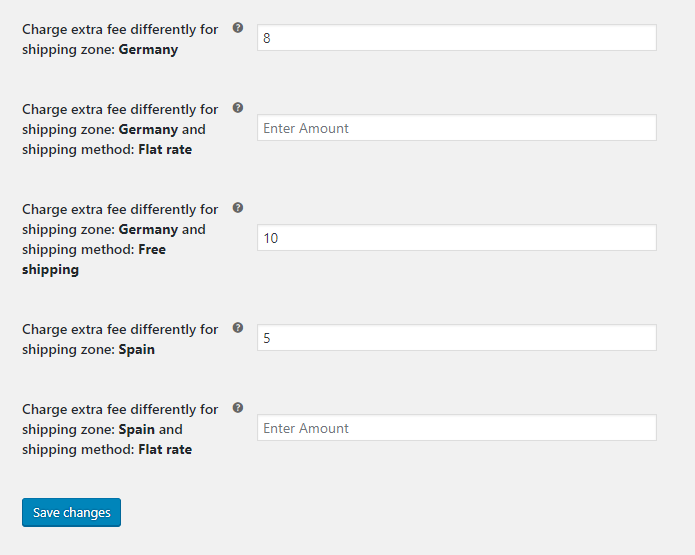
Instalación
- Upload plugin to your website and activate it
- Go as always to WooCommerce / Settings / Checkout / Cash On Delivery
- Setup your desired settings, click ‘Save Changes’, and you are ready to go!
Reseñas


Colaboradores y desarrolladores
«Smart COD for WooCommerce» es un software de código abierto. Las siguientes personas han colaborado con este plugin.
Colaboradores
«Smart COD for WooCommerce» ha sido traducido a 2 idiomas locales. Gracias a los traductores por sus contribuciones.
Traduce «Smart COD for WooCommerce» a tu idioma.
¿Interesado en el desarrollo?
Revisa el código , echa un vistazo al repositorio SVN o suscríbete al registro de desarrollo por RSS.
Registro de cambios
1.9.4
- Feature – Add optional COD Protection that can hide Cash on Delivery when checkout identity matches an eligible dispatched-then-cancelled COD order from the same store.
- Privacy – Send only locally generated SHA-256 identity tokens during checkout lookups; raw email and telephone values are never sent and lookup requests are not persisted by the service.
- Reliability – Keep checkout fail-open with a one-second timeout, strict response validation and short session caching.
- Admin – Place the opt-in directly below the main COD switch and show a one-time dismissible admin reminder.
- Localization – Add Greek translations for COD Protection and its data-sharing disclosure.
1.9.3
- Compatibility – Replace deprecated product-category queries with the current WordPress API; minimum WordPress version is now 4.5.
- Security – Prevent direct access to the admin display template.
- Transparency – Ship the checkout JavaScript in readable, uncompressed form and clarify optional country-level data pooling.
- Compatibility – Declare WooCommerce as a required plugin.
- Security – Harden the category search endpoint and escape merchant-facing admin values.
- Reliability – Safely handle malformed saved settings and sanitize checkout selections used by COD rules.
1.9.2
- Privacy – Make cancelled COD data sharing an explicit, default-off merchant opt-in; existing opt-out values do not count as consent.
- Admin – Remove remote promotional notifications and prominent PRO promotions from the Free plugin.
- Admin – Remove the remote settings-manager request and PRO-only locked fields; retain the existing local-pickup fee option.
- Admin – Use the Select2 script supplied by WooCommerce instead of bundling a second copy.
- Performance – Collect and transmit eligible order evidence only through small, rate-limited background batches; checkout and ordinary storefront requests remain unaffected.
- Enhancement – Recognise shipment data from supported tracking integrations and preserve custom fulfilment-status evidence without storing customer data in scheduled jobs.
- Enhancement – Add a conservative fallback for physical COD orders only on shops without a recognised tracking integration, after a minimum one-day order lifetime.
- Reliability – Re-scan historical eligible orders gradually after this upgrade and enrich the existing central event row without creating duplicate orders.
- Reliability – Include a bounded snapshot of earlier completed, tracked COD orders for the same shopper at the same shop.
- Privacy – Stop pending collection and delivery work when the merchant turns sharing off.
1.9.1
- Privacy – Tokenise email, telephone, postcode, city and region locally before relay; raw customer identity and location values never leave the store.
- Privacy – Introduce identity token scheme 1 for deterministic, checkout-compatible matching.
1.9.0
- Performance – Remote settings and promotional notices are cached and refreshed only in wp-admin; storefront, AJAX and REST requests no longer make external HTTP requests.
- Feature – Collect cancelled COD shipment metadata in rate-limited batches.
- Feature – Queue privacy-minimised Smart COD AI shipment events for secure delivery.
- Enhancement – Prepare operating-country-scoped customer matching tokens and remove local transport data after central acknowledgement.
- Reliability – Exclude cancelled COD orders unless a valid courier tracking code provides dispatch evidence.
- Compatibility – Updated WordPress and WooCommerce compatibility metadata.
1.7.3
- Fix – Deprecated creation of dynamic properties
1.6
- Fix – Bad require on admin partial
- Fix – Add method_exists before restriction check
1.5
- Fix – Don’t show extra fee, if it is 0
- Fix – Fix deprecated ternary operation
- Fix – Admin ui fixes
1.4.9.6
- Fix – Fix issue with states on admin.
1.4.9.5
- Tweak – Improved the way the DOMDocument parses the payment div to attach the custom message.
- Fix – Add support for the newly introduced WooCommerce settings, «shipping method enable»
- Fix – Fix the way the plugin calculates the total cart amount. Until now it would add the extra fee cost if any.
- Feature – You can select what defines the total cart amount by checking / unchecking taxes and shipping costs.
- Fix – Restore broken tiptip descriptions on admin page.
1.4.9.4
- Feature – Added a new filter to change the cod fee title ( wc_smart_cod_fee_title ).
1.4.9.3
- Fix – Fix extra fee outside of cod.
1.4.9.2
- Fix – Fix warnings on checkout, WC issue when payment method is one, translatable fee.
1.4.9.1
- Fix – Minor fixes on order pay page
1.4.9
- Fix – Fix issues with wrong shipping zone – method calculation.
1.4.8
- Fix – Minor fixes, custom select2 version missing, remove version check notice, fix some public code running outside checkout page.
1.4.7
- Feature – Add restriction based on shipping method inside shipping zone
- Feature – Optimize extra fee – shipping method inside shipping zone
- Tweak – Rewrite shipping method getter function.
1.4.6
- Fix – Optimize shipping method calculation
1.4.5
- Feature – Shipping Class Restriction
- Feature – City Restriction
- Feature – Product Restriction now supports variable products
- Feature – Extra Fee now can be taxable
- Feature – Postal Codes now supports ranges
- Fix – Warnings on custom messages
1.4.4
- Fix – Fix issue with wrong calculation on amount restriction.
- Feature – Now you can have different messages per restrict reason.
1.4.3
- Fix – Fix issue with notice on empty extra fee.
1.4.2
- Fix – Fix issue with cod getting disabled, when ‘enable for shipping methods’ is empty.
1.4.1
- Fix – Fix issue with extra fee appears in restricted shipping method.
1.4.0
- Tweak – Select2 compatibility for older woocommerce versions
- Feature – Restriction mode is now independent per field ( enable / disable )
- Feature – Price now can be percentage for every price field with rounding option
- Feature – Added restriction for states / counties
- Feature – Added restriction for user roles
1.3.6
- Tweak – Product and product categories are now fetched asynchronously to resolve timeout issues.
1.3.5
- Feature – Restrict cod gateway based on customer’s cart product’s categories.
- Feature – Restrict cod gateway based on customer’s cart products.
1.3.4
- Tweak – Tweak the way the plugin calculates the availability based on postal codes.
- Feature – Restrict cod gateway based on customer’s cart amount.
- Feature – Added filter for developers: wc_smart_cod_fee
1.3.3
- Fix – Fix warning on empty foreach.
1.3.2
- Fix – Fix issue with cod check method running outside checkout, creating problem with wp menus.
1.3.1
- Feature – Added custom information message when the cod is not available.
1.3
- Feature – Added restriction mode option – exclude or include –
- Feature – Added different price per country
- Fix – Fix issue when delimiter was a «,»
1.2
- Feature – Different amount charge, based on shipping method.
- Feature – Different amount charge, based on shipping zone and shipping method.
- Feature – Added a quick link to WooCommerce Cod Settings as a notice, when the plugin get’s activated.
- Fix – When you select a country or postal code which doesn’t have cod available, while you previous where on country or postal code which have the cod available, the extra fees will be applied on ajax request.
- Tweak – Clean up settings on database when a shipping zone get’s deleted
- Tweak – Don’t store settings on database when they are not required.
1.1.2
- Add support for older PHP versions ( < 5.4 ).
1.1.1
- Add support for older WooCommerce versions ( < 2.6 ).
1.0
- Deploy of the first version of the plugin.