
Descripción
Proxy & VPN Blocker In Brief
Proxy & VPN Blocker prevents access to your WordPress login, registration pages, selected pages and posts (or the entire site!) by proxies, Tor, VPNs, specific IP addresses, ranges, ASN, and selected countries using the proxycheck.io API. It also blocks comments from these sources, helping to prevent spam as many spammers use anonymising services to hide their true location.
Features
Below is a list of the main features supported by this Plugin.
- Detects and Blocks Proxies, SOCKS4/4a & SOCKS5/5h, The Onion Router (TOR), Mysterium Network Nodes, Web Proxies, Compromised Servers and more, to your specifications.
- Optional blocking of VPNs.
- Support for Cloudflare or other Content Delivery Network providers headers.
- Support for both IPv4 and IPv6.
- Securely communicates with the proxycheck.io API.
- Block select Countries (Geolocation) by selecting them from a list, with the option to create a whitelist instead.
- Caching of known good IP addresses for a configurable duration (between ten and 240 minutes) to minimize repeat queries and improve performance for legitimate visitors.
- Optional blocking based on IP Risk Score functionality provided by the proxycheck.io API.
- Logging of User Registration and Most Recent login IP Address right in the users list and user profile page (for admin viewing).
Note: By default blocking happens on Login, Registration, WP-Admin area, posting comments, and pingbacks, but you can extend this to blocking on any specified page or post from within the Pages/Posts lists or specifying it to be restricted access when creating a Page/Post in the WordPress editor.
Added Extras
Proxy & VPN Blocker goes beyond the basic API features of proxycheck.io. It includes built-in country blocking, an API Key statistics page, and allows modification of your proxycheck.io Whitelist and Blacklist directly from your WordPress Dashboard. This integration streamlines the management process by providing most functionalities within WordPress, eliminating the need to login to the proxycheck.io Dashboard.
Customization
- Specify additional pages and posts to protect beyond the default settings.
- Choose a specific page on your site as the «Access Denied» page displayed to blocked visitors, replacing the default message page.
- Define a custom blocked message to be displayed if a custom Block page redirect isn’t specified.
The proxycheck.io API
This Plugin can be used without a proxycheck.io API key, but it will be limited to 100 daily queries to the API. To enhance the capabilities, you can obtain a free API key from proxycheck.io, which allows for 1,000 free daily queries, making it suitable for small WordPress sites.
Here’s an overview of the free and paid API options:
- Free Users without an API Key: 100 Daily Queries.
- Free Users with an API Key: 1,000 Daily Queries.
- Paid Users with an API Key: 10,000 to 10.24 Million+ Daily Queries.
It’s important to note that your API key can be used on multiple sites or applications, providing flexibility in its usage.
User IP Logging Feature
Proxy & VPN Blocker allows for local logging of user registration IP addresses. The IP addresses are displayed next to each user in the Users list and on their profile pages, visible to administrators. The Plugin also logs the most recent login IP address for each user, which is also displayed in the User’s list and profile page, with the IP address linked to the proxycheck.io Threats page.
Caching Plugin Notice
If your WordPress site utilizes a Caching Plugin (e.g., WP Rocket, WP Super Cache), please note that blocking on specific pages, posts, or the option to block on all pages may not function correctly due to caching plugin mechanisms, a DONOTCACHEPAGE option is provided, which goes some way to solving this.
Privacy Notice
This Plugin is designed to work with the proxycheck.io API and by extension of this, the IP addresses of your site visitors are sent to the API to be checked. No other user identifiable information is transmitted. Please refer to the proxycheck.io privacy notice and GDPR Compliance for further information. The Plugin developer does not have access to information that identifies your website users.
Disclaimer
This Plugin is not made by proxycheck.io despite being recommended by the service, if you need support with the Proxy & VPN Blocker Plugin please use the WordPress Support page for this Plugin and not proxycheck.io support on their website, unless you have a query relating to the proxycheck.io API, service or your account. Likewise the Plugin developer does not provide support for issues relating to your proxycheck.io account or the API. The Plugin developer and proxycheck.io are not the same entity. Logo used with express permission.
Capturas

Options UI. 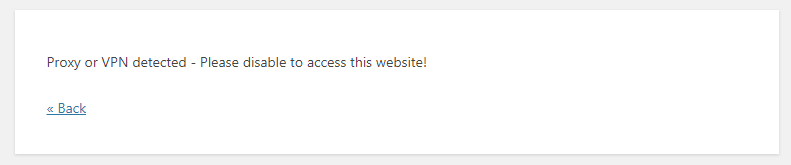
Default Error message shown when a proxy or vpn is detected, this can be changed in the options. 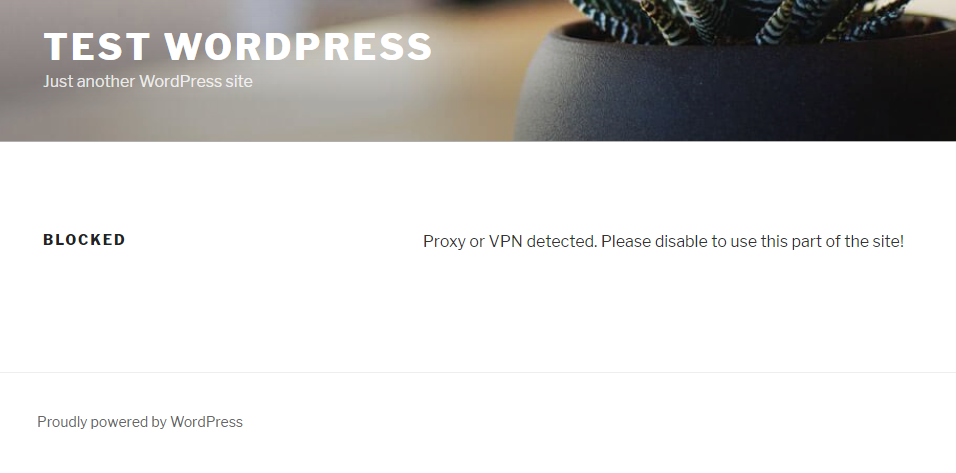
Error message example if you opt to use a page within your site's theme. 
API Key Stats page. 
Whitelist editor page. The blacklist editor page looks similar to this.
Instalación
Installing «Proxy & VPN Blocker» can be done either by searching for «Proxy & VPN Blocker» via the «Plugins > Add New» screen in your WordPress dashboard, or by using the following steps:
- Download the Plugin via WordPress.org
- Upload the ZIP file through the ‘Plugins > Add New > Upload’ screen in your WordPress dashboard
- Activate the Plugin through the ‘Plugins’ menu in WordPress
Preguntas frecuentes
-
What is proxycheck.io?
-
Proxycheck.io is a simple, accurate and reliable API for the detection and blocking of people using Proxies, Tor & VPN servers.
-
Blocking Proxies and VPN’s on all pages?
-
Although this Plugin has an option to block Proxies & VPN’s on all pages, this option is not generally recommended due to significantly higher query usage, but was added on user request.
It is important to note that if you are using a WordPress caching Plugin (eg WP Super Cache, WP Rocket, W3 Total Cache and many others), these will prevent the Proxy or VPN from being blocked if you are using ‘Block on all pages’ as the caching Plugin will likely serve the visitor a static cached version of your website pages. As the cached pages are served by the caching Plugin in static HTML, the code for proxy detection will not run on these cached pages. This won’t affect the normal protections this Plugin provides for Log-in, Registration and commenting.
-
I accidently locked myself out by blocking my own country/continent, what do I do?
-
The fix is simple, upload a .txt file called disablepvb.txt to your wordpress root directory, PVB looks for this file when the proxy and VPN checks are made, if the file exists it will prevent the Plugin from contacting the proxycheck.io API. You will now be able to log in and remove your country/continent in the PVB Settings.
Remember: If you ever have to do this, delete the disablepvb.txt file after you are done! If you don’t remove it, the Plugin wont be protecting your site.
Reseñas


Colaboradores y desarrolladores
«Proxy & VPN Blocker» es un software de código abierto. Las siguientes personas han colaborado con este plugin.
Colaboradores
Traduce «Proxy & VPN Blocker» a tu idioma.
¿Interesado en el desarrollo?
Revisa el código , echa un vistazo al repositorio SVN o suscríbete al registro de desarrollo por RSS.
Registro de cambios
2.3.10 2024-03-22
- Minor code improvements.
- Added code that prevents Matomo Analytics plugin from being restricted.
- See changelog.txt for older versions.